


Wireless Gamepad For Xbox One/Xbox Series X/S/Pc Controllers With Six-Axis Gyro Turbo Function Game Consoles Controller Joystick
SPECIFICATIONS
Battery Included: Yes
Brand Name: bonacell
Certification: CE
Compatible Brand/Model: Microsoft
Compatible Microsoft Model: Xbox One,xbox,Xbox One S,Xbox One X,XBOX SERIES X,Xbox Series S
Compatible Platform: xbox,PC
Hall Effect: Yes
High-concerned chemical: None
Interface Type: 2.4G
Model Number: RH-1022
Origin: Mainland China
Package: Yes
Trigger Button Type: Hall-Linear
Type: Gamepads
control x-box seres s: For xbox controllers
controle x-box one: controle x-box one
x-box one controller: Wireless Gamepad
Note: If you encounter incompatibility with Xbox One, please contact the merchant in time. The merchant will send the upgrade package to the customer within 24 hours. Please do not file a dispute directly. Thank you for your understanding
Note:Customers can purchase the receiver separately but the controller is not included
he sales volume exceeds1,000orders in a week, and the number of visitors exceeds50,000.The store manager recommends items
2.4 G Wireless Game Controller For XBOX ONE ,XBOX SERIS S,X PC
Specification
A new version of the 2.4G wireless handle,and wired connections are also possible,Can be connected wirelessly with PC computer (Windows10 and above )
Features
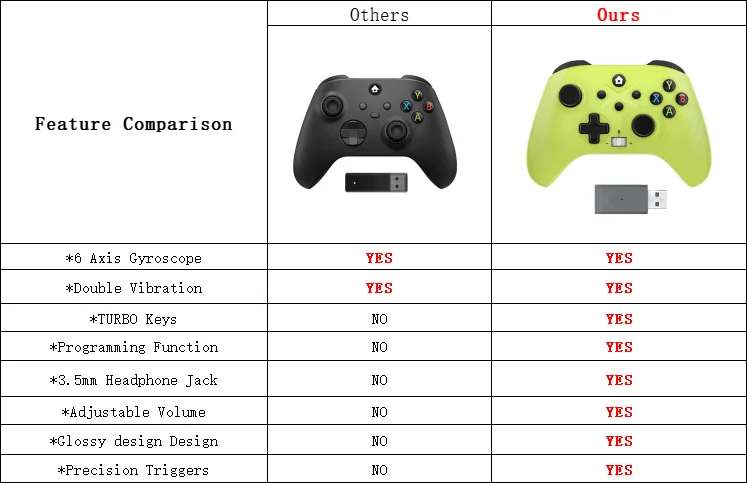
*6 axis gyroscope
*Double Vibration
*TURBO Keys
*Programming Function
*3.5mm Headphone Jack
*Anti-slip ergonomic design
*Precision Triggers
*Button effective distance: 10M
*Sound effective distance: 6M
The product has a built-in rechargeable battery, no need to replace it, and it can last for about 11 hours after a single charge.
▶ About the connection of the controller:
X-box consoles connection:
1. Turn on the X-box Console power
2. Insert the USB Dongle receiver
3. Press and hold the controller HOME button for 1 second, indicator light began to flash.
(HOME button and the indicator light of the USB Dongle keep on at the same time, indicating that the pairing is successful)
PC wireless connection (WINDOWS 10 and above system):
1. Insert the USB Dongle into the PC
2. Press and hold the controller HOME button for 1 second.
(the indicator light of the receiver and HOME button keep on at the same time, indicating that the pairing is successful)
▶ Note:
1. 3D joystick calibration
- After turning on, automatically calibrate 3D joystick (do not touch the 3D joystick when booting).
2. Reset function
- When the controller appears abnormal, you can use the reset key behind the controller to reset.


Shipping Question
1.If it is quality problem, buyer can submit argue within 15 days after receiving the goods, the buyer pls provide about the question information: such as photos or video and other evidence to seller for identify. thank.
2.Product quality processing program:
(1) if the item bad or broken,we will full return or part return . (the liar excluede)
(2) if your need want kown the order transport ,
pls use :Aliexpress standard order : https://global.cainiao.com
Other shipping methods : https://www.17track.net/en